
Feature Releases
Stay up-to-date with the latest platform improvements
Stay up-to-date with the latest platform improvements
Filter by
Audience
All Audience
MediQo Website Widget
We're excited to announce the release of the MediQo Website Widget, giving patients the ability to book, reschedule and manage appointments directly through your website, 24 hours a day, 7 days a week.
Just like MediQo's AI Receptionist, the Website Widget integrates directly with your PMS, understands your appointment types, clinician availability and booking rules, and helps patients find the right appointment at the right time.
This feature has been rolled out across the entire MediQo AI ecosystem and is accessible to all accounts, including those on a free trial period.

Why clinics love this feature
✔️ Capture more appointments outside business hours
✔️ Improve patient access and convenience
✔️ Reduce inbound phone enquiries
✔️ Allow patients to book or change appointments online at any time
✔️ Provide another pathway for new patient acquisition
✔️ Increase utilisation of available appointment slots
How does it work?
The Website Widget uses the same booking logic and configuration as your AI Receptionist, ensuring a consistent patient experience across both phone and website channels. Appointments are booked directly into your PMS in real time, with no double handling required.
Is it customisable?
Yes. The Widget follows the same appointment types, booking rules and workflows you've already configured within MediQo.
Does it cost extra?
No. The Website Widget is included as part of your existing MediQo subscription.
How do I install it?
Simply log in to your MediQo Portal
Click Website Widget
Follow the setup instructions
Copy the embed code into your website or send it to your website developer
You can typically install the widget in just a few minutes. Or, if you don't have a website developer, we can recommend a trusted partner who can complete the installation for you.
If you’d like a walkthrough of this feature, or haven’t explored MediQo recently, we’d be happy to show you what’s possible.
You can book a quick demo here, or you can start a free trial any time.

Share





New AI Receptionist Dashboard
We’ve just released a major enhancement to MediQo’s AI Receptionist, giving clinics comprehensive visibility into patient calls, bookings, and overall performance in real time.
The new AI Receptionist Dashboard includes detailed reporting on:
Total calls handled
Call duration
New patient bookings
Transfers to human reception
Total appointments booked
Appointment cancellations
Overall AI minutes used
This feature has been rolled out across the entire MediQo AI ecosystem and is accessible to all accounts, including those on a free trial period.
When you need more detail on a patient interaction, you can click directly into Conversation Summaries to view:
Time of the call
Call duration
Call outcomes
Conversation summaries
Detailed interaction history
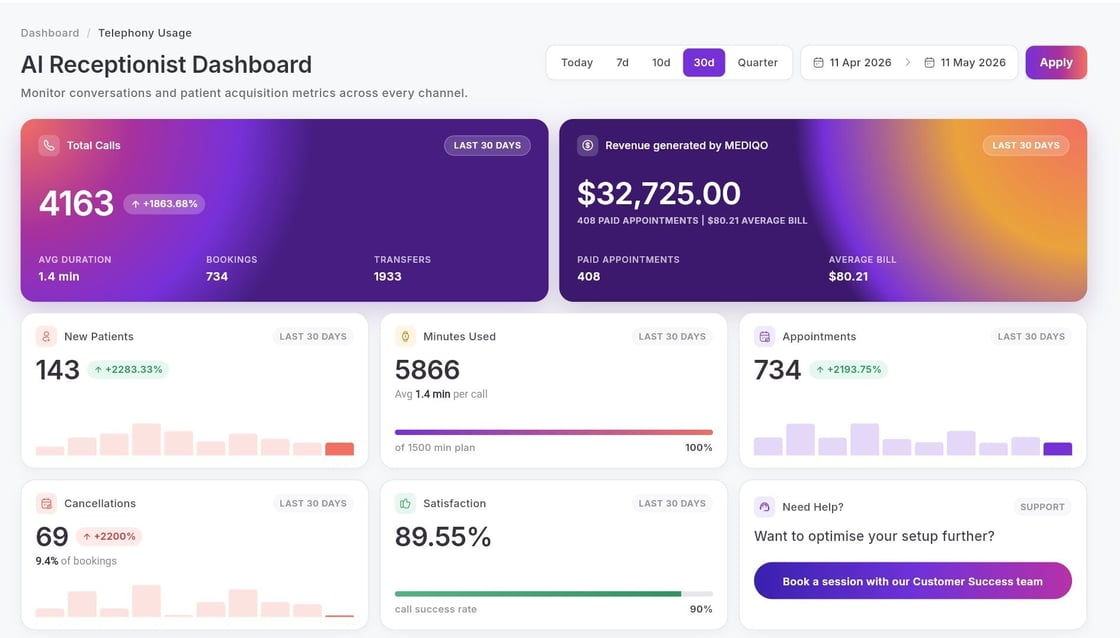
Why clinics love this feature
Understanding the true impact of your AI receptionist shouldn’t require guesswork or complicated reporting. With this update, MediQo helps clinics:
✔️ Measure appointment and patient acquisition performance in real time
✔️ Understand call volumes and receptionist workload reduction
✔️ Monitor patient sentiment and caller experience
✔️ Identify trends, frequently asked questions, and workflow opportunities
✔️ Review detailed call outcomes and conversation history when needed
✔️ Gain clearer visibility into operational efficiency and growth opportunities
These insights also help clinics continuously improve their AI receptionist configuration and knowledge base over time, resulting in better patient experiences and stronger booking outcomes.
If you’d like a walkthrough of this feature, or haven’t explored MediQo recently, we’d be happy to show you what’s possible.
Share
Dual Bookings
We’re excited to introduce a new feature in MediQo designed to give clinics and aged care facilities more flexibility when scheduling appointments that require multiple practitioners.
With Dual Booking, you can now configure appointment types that include additional practitioners, such as nurses or allied health staff, as part of the same patient booking.
This feature has been rolled out across the entire MediQo ecosystem and is available to all accounts, including those on a free trial period.

How it works
When setting up an appointment type, you can now select a related appointment type and include additional practitioners.
You can:
Select specific practitioners to be included in the appointment
Choose whether they are required before, during, or after the main consult
Set a custom duration for their involvement (for example, a 15-minute assessment due to start 5 minutes into the consult)
Configure independent start times and durations for each practitioner
This means you can create workflows such as:
A nurse completing a short assessment before the doctor consult
A practitioner joining part-way through an appointment for a defined period
If all required practitioners are not available, the appointment will not be offered for booking. Once configured, you will see separate calendar entries for each practitioner involved in the appointment.

Why clinics love this feature
Coordinating multiple practitioners for a single appointment can be complex and time-consuming. With this update, MediQo helps you:
✔️ Coordinate multi-practitioner appointments automatically
✔️ Ensure all required staff are available before booking
✔️ Reduce or remove manual scheduling and back-and-forth
✔️ Support more structured and consistent patient workflows
✔️ Improve visibility across clinician and nurse schedules
This is another way MediQo helps clinics streamline operations, improve coordination between teams, and deliver more efficient patient care.
If you’d like to see it in action, you can book a quick demo here, or you can start a free trial any time.
Share
AI Receptionist Summary of Patient Enquiries
We've just released a new enhancement to MediQo’s AI Receptionist, designed to improve the patient experience.
If your AI Receptionist is unable to assist with a patient enquiry or a transfer to a human receptionist is not available, a summary of the conversation will be emailed to the clinic, including all relevant details and next steps to best solve the patient's enquiry.
This feature has been rolled out across the entire MediQo ecosystem and is available to all accounts, including those on a free trial period.
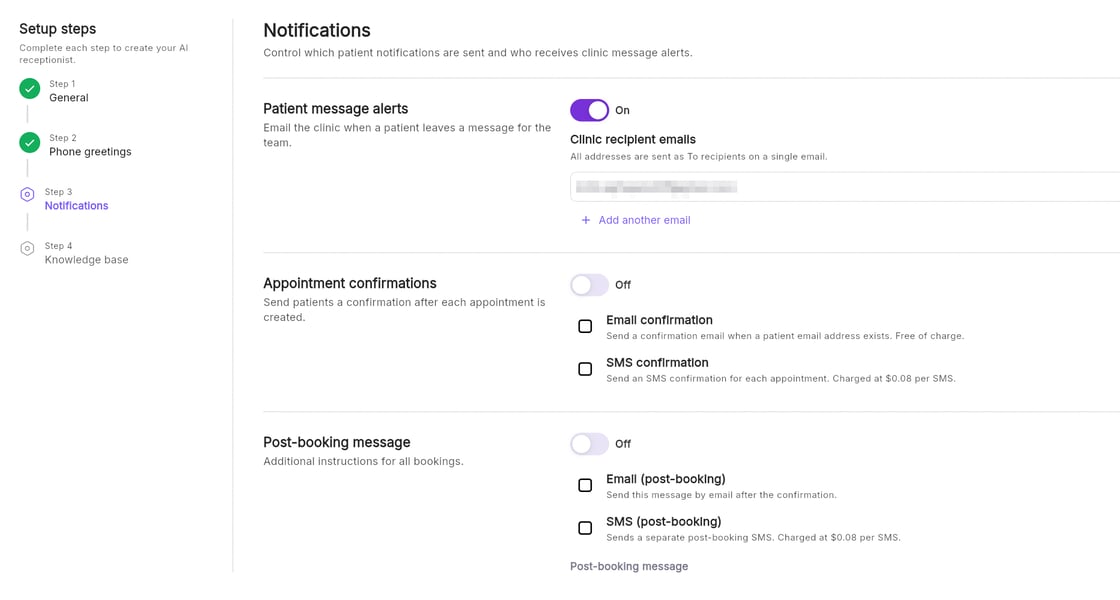
Why clinics love this feature
Alongside MediQo's comprehensive AI Receptionist call summaries, this enhancement ensures every patient interaction is captured, documented and actioned. With this update, MediQo helps you:
✔️ Capture and transcribe patient messages automatically
✔️ Receive messages instantly via email for faster follow-up
✔️ Maintain a permanent, searchable record of communication
Try Australia's most customisable AI Receptionist
MediQo’s AI Receptionist is purpose-built for Australian healthcare, combining enterprise-grade security, reliability and flexible customisation to fit the way your clinic actually works.
Ready to try to a test call? Click the phone icon below to try it out.

✔️ Customise AI receptionist voice, name, greeting and gender
✔️ Add booking, location and other frequently asked questions instantly
✔️ Set specific booking days and hours (e.g. reserve time for walk-ins)
✔️ Enable email and SMS appointment confirmations
✔️ Deliver pre-appointment instructions via SMS or email
✔️ Restrict bookings for specific patients using blacklist functionality
Plus, when you sign up for MediQo's AI Receptionist, you'll get access to our full suite of clinical AI tools, including AI scribe, MBS billing suggestions and clinic reporting, for free.
If you’d like to see it in action, you can book a quick demo here, or you can start a free trial any time.
Share
Daily Billing Summaries
We’ve just released a new feature to give you real-time visibility of your daily billing. From your appointments view in MediQo, you can now see:
The value of each consult
Whether it’s been invoiced or paid
Your total daily consultation value
A live breakdown of invoiced vs paid revenue
All of this is pulled directly from your practice management system and updates automatically in real time.
This feature has been rolled out across the entire MediQo AI ecosystem and is accessible to all accounts, including those on a free trial period.

Why clinics love this feature
Instead of running reports in your PMS to understand how your daily billing is tracking, you can view this information Live, next to each patient consult in MediQo.
No more jumping into your PMS to check billing
Better visibility across the day
Easier tracking of revenue and payments
A simple way to stay on top of performance
Some clinics are even using this to help motivate clinicians and improve awareness of billing patterns.
When you combine this with MBS Billing Suggestions and AI Receptionists that can book patient appointments after hours, this is another way MediQo helps practices grow their revenue, without adding more work.
If you’d like a walkthrough of this feature, or haven’t explored MediQo recently, we’d be happy to show you what’s possible.
You can book a quick demo here, or you can start a free trial any time.
Share
Snippets
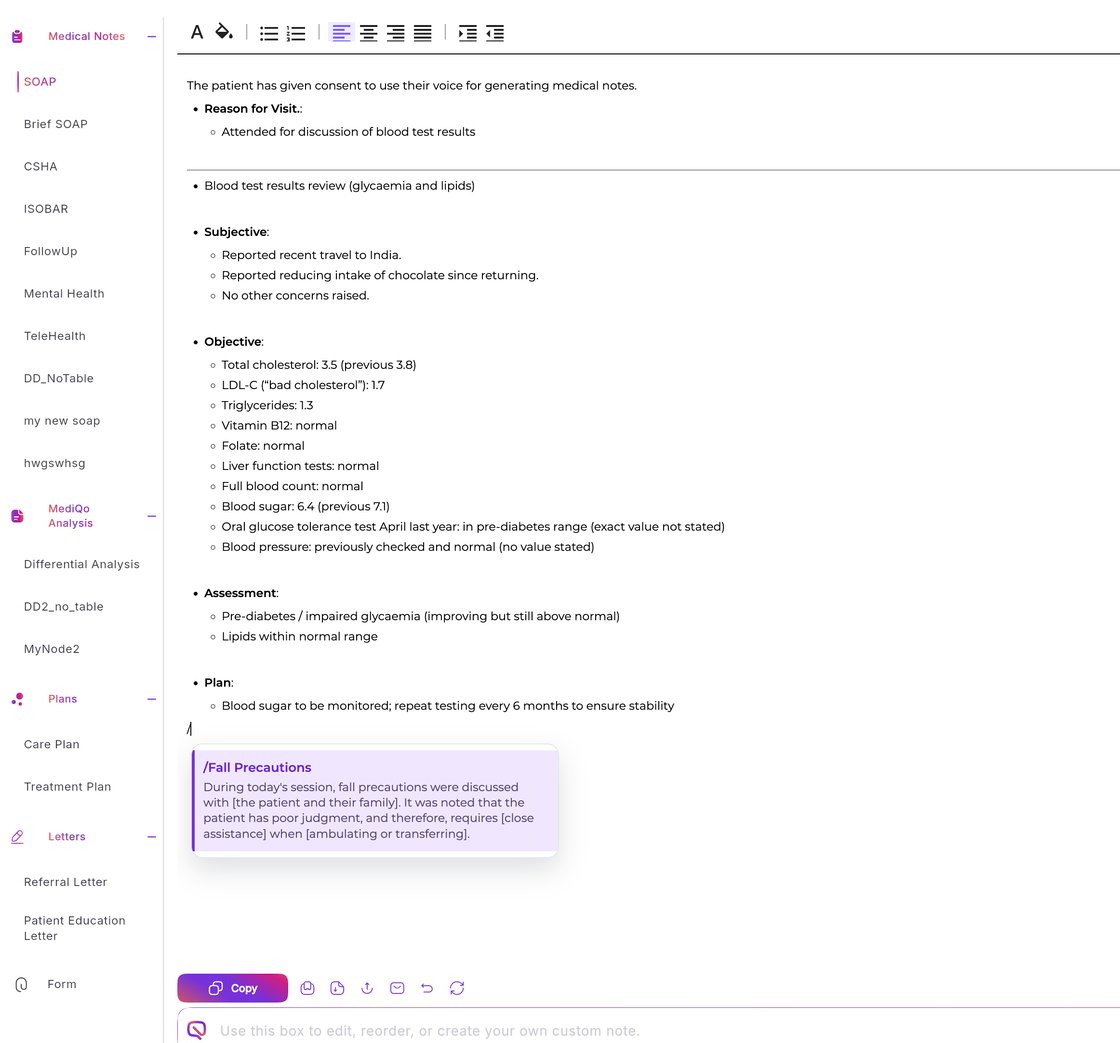
We’re excited to introduce a new feature in MediQo designed to help clinicians document faster and more consistently. Snippets work like keyboard shortcuts for your clinical notes. With a simple trigger word, you can instantly insert commonly used paragraphs or phrases, saving time while ensuring your notes remain detailed and consistent.
This feature has been rolled out across the entire MediQo ecosystem and is available to all accounts, including those on a free trial period.
How it works
Snippets can be used across multiple sections in MediQo, helping streamline documentation throughout the patient record. To set these up, simply navigate to Clinical Settings, select Snippets and click Add New to create a new text shortcut, or edit or delete any time as needed.
When you're ready, press / in note fields to activate the snippets menu and select the snippet you want to insert. The full text will instantly populate your note.

Why clinics love this feature
With this update, MediQo helps you:
✔️ Replace short triggers with full text
Type a shortcut and automatically insert a full paragraph or structured note.
✔️ Speed up clinical documentation
Capture detailed notes in seconds without retyping the same information.
✔️ Improve consistency across records
Ensure common explanations, assessments, and instructions are documented the same way every time.
✔️ Reduce admin burden during consults
Spend less time typing and more time focusing on patients.
If you’d like to see it in action, you can book a quick demo here, or you can start a free trial any time.
Share
Search for MBS Billing Eligibility
We've just released a new enhancement to MediQo’s Smart MBS Billing Suggestions — making it easier to find and apply the correct Medicare item numbers during your consultations.
This feature has been rolled out across the entire MediQo ecosystem and is available to all accounts, including those on a free trial period.

How it works
While you're in a patient consult, simply open the MBS Suggestions panel, view the recommendations based on your consult, or search for other MBS item numbers to view eligibility details.
MBS Suggestions will be populated based on the context of your consultation and your own practitioner type, so you can be sure that you're billing correctly.

Why clinics love this feature
MBS billing can be complex, and finding the right item number often means navigating large, and constantly changing Medicare schedules and external references.
With this update, MediQo helps you:
✔️ Quickly locate relevant item numbers
✔️ Review eligibility requirements in context
✔️ Reduce missed billing opportunities
✔️ Improve billing confidence and accuracy
If you’d like to see it in action, you can book a quick demo here, or you can start a free trial any time.
Share
Blacklist Patients from Appointments
We’ve just released two powerful enhancements to the MediQo AI Receptionist, giving your clinic greater control over how bookings are managed.
These updates were developed directly from clinic feedback, and they’re designed to give you flexibility without adding complexity. These features are accessible to all accounts, including those on a free trial period.
Block Specific Patients from Booking via AI
You can now prevent selected patients from completing bookings through the AI Receptionist. If a blacklisted patient calls:
The AI will automatically transfer them to a human receptionist
They won’t be able to complete the booking through AI
Why clinics use this feature:
Repeated no-shows
Outstanding unpaid bills
Aggressive or inappropriate behaviour
Complex booking requirements
Situations requiring manual oversight
This ensures your team retains control where needed, while AI Receptionists continue to handle the rest.
Set AI Booking Hours
You can now define exactly when the AI Receptionist is allowed to book appointments. This allows you to:
Reserve time blocks for walk-ins
Keep complex bookings for human staff
Align AI bookings with staffing levels
Maintain hybrid reception models
If a patient calls outside AI booking hours:
The AI will suggest available appointments within approved time windows
Or route the call appropriately if required
No IVR changes are needed, this works seamlessly within your existing setup.
How it works
Simply navigate to the AI Receptionist Settings in MediQo, click the ‘Clinic Rules’ button on the left hand side and configure as appropriate.

Why we love this feature
These enhancements allow you to:
✔ Maintain flexibility
✔ Protect operational workflows
✔ Manage higher-risk or complex patients appropriately
✔ Optimise appointment allocation
If you haven’t explored our AI Receptionist recently and would like a quick walkthrough of what’s possible, we’d be happy to show you.
You can book a quick demo here, or you can start a free trial any time.
Share
Patient Observations
We’ve just released a powerful new AI Patient Observation Assistant inside MediQo, designed to save time during consults and surface critical health trends instantly.
MediQo now automatically charts key patient observations alongside your AI Scribe and other AI tools, including:
• Body Mass Index (BMI)
• Body Weight
• Blood Pressure
• Body Temperature
• Heart Rate
• Capillary Refill Time
This feature has been rolled out across the entire MediQo ecosystem and is accessible to all accounts, including those on a free trial period.

How it works
When you’re in a patient consult, MediQo automatically extracts observation data from consultation audio, records and charts historical values, displays longitudinal trends in real time and flags readings as normal or risky, assisting with follow-up. There’s no manual data entry required.
If you click on any observation, you can open a detailed view to assess changes over time, helping you identify patterns, deterioration, or risk indicators without digging through notes.

Why we love this feature
This means clinicians no longer have to search through your PMS to find trends in blood pressure or weight. This feature saves valuable time during consults, improves visibility of longitudinal trends, supports earlier intervention, enhances chronic disease monitoring and reduces missed follow-up opportunities.
If you’d like a walkthrough of this feature, or haven’t explored MediQo recently, we’d be happy to show you what’s possible.
You can book a quick demo here, or you can start a free trial any time.
Share
Enhanced AI Receptionist Configuration
We’ve just released two powerful enhancements to the MediQo AI Receptionist, giving your clinic greater control over how bookings are managed.
These updates were developed directly from clinic feedback, and they’re designed to give you flexibility without adding complexity. These features are accessible to all accounts, including those on a free trial period.
Block Specific Patients from Booking via AI
You can now prevent selected patients from completing bookings through the AI Receptionist. If a blacklisted patient calls:
The AI will automatically transfer them to a human receptionist
They won’t be able to complete the booking through AI
Why clinics use this feature:
Repeated no-shows
Outstanding unpaid bills
Aggressive or inappropriate behaviour
Complex booking requirements
Situations requiring manual oversight
This ensures your team retains control where needed, while AI Receptionists continue to handle the rest.
Set AI Booking Hours
You can now define exactly when the AI Receptionist is allowed to book appointments. This allows you to:
Reserve time blocks for walk-ins
Keep complex bookings for human staff
Align AI bookings with staffing levels
Maintain hybrid reception models
If a patient calls outside AI booking hours:
The AI will suggest available appointments within approved time windows
Or route the call appropriately if required
No IVR changes are needed, this works seamlessly within your existing setup.
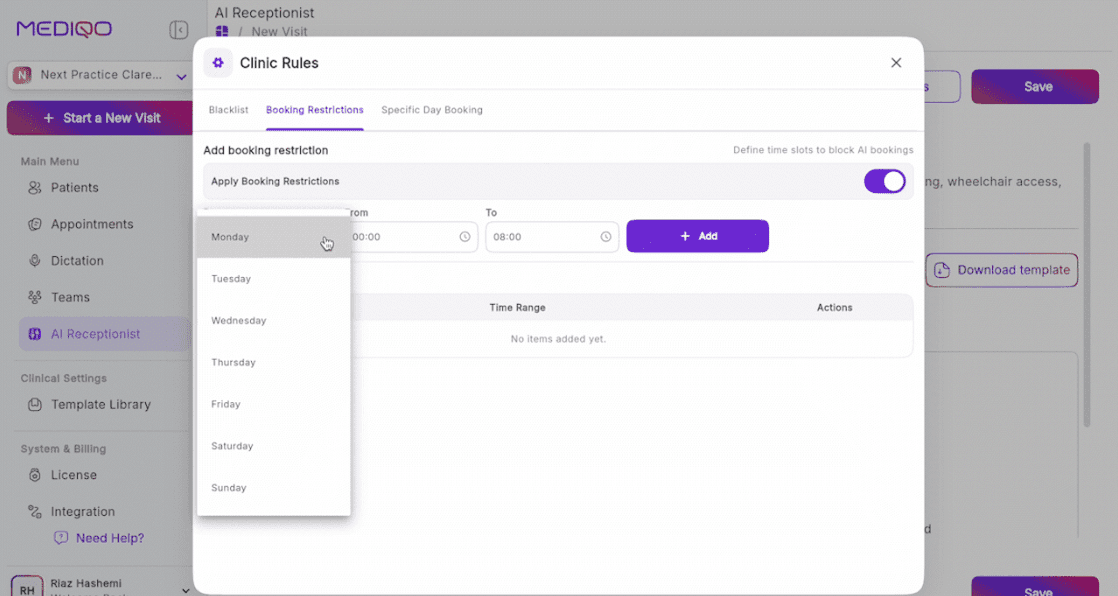
How it works
Simply navigate to the AI Receptionist Settings in MediQo, click the ‘Clinic Rules’ button on the left hand side and configure as appropriate.
Why we love this feature
These enhancements allow you to:
Maintain flexibility
Protect operational workflows
Manage higher-risk or complex patients appropriately
Optimise appointment allocation
If you haven’t explored our AI Receptionist recently and would like a quick walkthrough of what’s possible, we’d be happy to show you.
You can book a quick demo here, or you can start a free trial any time.
Share
Filter by
Audience
All Audience
MediQo Website Widget
We're excited to announce the release of the MediQo Website Widget, giving patients the ability to book, reschedule and manage appointments directly through your website, 24 hours a day, 7 days a week.
Just like MediQo's AI Receptionist, the Website Widget integrates directly with your PMS, understands your appointment types, clinician availability and booking rules, and helps patients find the right appointment at the right time.
This feature has been rolled out across the entire MediQo AI ecosystem and is accessible to all accounts, including those on a free trial period.
Why clinics love this feature
✔️ Capture more appointments outside business hours
✔️ Improve patient access and convenience
✔️ Reduce inbound phone enquiries
✔️ Allow patients to book or change appointments online at any time
✔️ Provide another pathway for new patient acquisition
✔️ Increase utilisation of available appointment slots
How does it work?
The Website Widget uses the same booking logic and configuration as your AI Receptionist, ensuring a consistent patient experience across both phone and website channels. Appointments are booked directly into your PMS in real time, with no double handling required.
Is it customisable?
Yes. The Widget follows the same appointment types, booking rules and workflows you've already configured within MediQo.
Does it cost extra?
No. The Website Widget is included as part of your existing MediQo subscription.
How do I install it?
Simply log in to your MediQo Portal
Click Website Widget
Follow the setup instructions
Copy the embed code into your website or send it to your website developer
You can typically install the widget in just a few minutes. Or, if you don't have a website developer, we can recommend a trusted partner who can complete the installation for you.
If you’d like a walkthrough of this feature, or haven’t explored MediQo recently, we’d be happy to show you what’s possible.
You can book a quick demo here, or you can start a free trial any time.
Share
New AI Receptionist Dashboard
We’ve just released a major enhancement to MediQo’s AI Receptionist, giving clinics comprehensive visibility into patient calls, bookings, and overall performance in real time.
The new AI Receptionist Dashboard includes detailed reporting on:
Total calls handled
Call duration
New patient bookings
Transfers to human reception
Total appointments booked
Appointment cancellations
Overall AI minutes used
This feature has been rolled out across the entire MediQo AI ecosystem and is accessible to all accounts, including those on a free trial period.
When you need more detail on a patient interaction, you can click directly into Conversation Summaries to view:
Time of the call
Call duration
Call outcomes
Conversation summaries
Detailed interaction history
Why clinics love this feature
Understanding the true impact of your AI receptionist shouldn’t require guesswork or complicated reporting. With this update, MediQo helps clinics:
✔️ Measure appointment and patient acquisition performance in real time
✔️ Understand call volumes and receptionist workload reduction
✔️ Monitor patient sentiment and caller experience
✔️ Identify trends, frequently asked questions, and workflow opportunities
✔️ Review detailed call outcomes and conversation history when needed
✔️ Gain clearer visibility into operational efficiency and growth opportunities
These insights also help clinics continuously improve their AI receptionist configuration and knowledge base over time, resulting in better patient experiences and stronger booking outcomes.
If you’d like a walkthrough of this feature, or haven’t explored MediQo recently, we’d be happy to show you what’s possible.
Share
Dual Bookings
We’re excited to introduce a new feature in MediQo designed to give clinics and aged care facilities more flexibility when scheduling appointments that require multiple practitioners.
With Dual Booking, you can now configure appointment types that include additional practitioners, such as nurses or allied health staff, as part of the same patient booking.
This feature has been rolled out across the entire MediQo ecosystem and is available to all accounts, including those on a free trial period.
How it works
When setting up an appointment type, you can now select a related appointment type and include additional practitioners.
You can:
Select specific practitioners to be included in the appointment
Choose whether they are required before, during, or after the main consult
Set a custom duration for their involvement (for example, a 15-minute assessment due to start 5 minutes into the consult)
Configure independent start times and durations for each practitioner
This means you can create workflows such as:
A nurse completing a short assessment before the doctor consult
A practitioner joining part-way through an appointment for a defined period
If all required practitioners are not available, the appointment will not be offered for booking. Once configured, you will see separate calendar entries for each practitioner involved in the appointment.
Why clinics love this feature
Coordinating multiple practitioners for a single appointment can be complex and time-consuming. With this update, MediQo helps you:
✔️ Coordinate multi-practitioner appointments automatically
✔️ Ensure all required staff are available before booking
✔️ Reduce or remove manual scheduling and back-and-forth
✔️ Support more structured and consistent patient workflows
✔️ Improve visibility across clinician and nurse schedules
This is another way MediQo helps clinics streamline operations, improve coordination between teams, and deliver more efficient patient care.
If you’d like to see it in action, you can book a quick demo here, or you can start a free trial any time.
Share
AI Receptionist Summary of Patient Enquiries
We've just released a new enhancement to MediQo’s AI Receptionist, designed to improve the patient experience.
If your AI Receptionist is unable to assist with a patient enquiry or a transfer to a human receptionist is not available, a summary of the conversation will be emailed to the clinic, including all relevant details and next steps to best solve the patient's enquiry.
This feature has been rolled out across the entire MediQo ecosystem and is available to all accounts, including those on a free trial period.
Why clinics love this feature
Alongside MediQo's comprehensive AI Receptionist call summaries, this enhancement ensures every patient interaction is captured, documented and actioned. With this update, MediQo helps you:
✔️ Capture and transcribe patient messages automatically
✔️ Receive messages instantly via email for faster follow-up
✔️ Maintain a permanent, searchable record of communication
Try Australia's most customisable AI Receptionist
MediQo’s AI Receptionist is purpose-built for Australian healthcare, combining enterprise-grade security, reliability and flexible customisation to fit the way your clinic actually works.
Ready to try to a test call? Click the phone icon below to try it out.
✔️ Customise AI receptionist voice, name, greeting and gender
✔️ Add booking, location and other frequently asked questions instantly
✔️ Set specific booking days and hours (e.g. reserve time for walk-ins)
✔️ Enable email and SMS appointment confirmations
✔️ Deliver pre-appointment instructions via SMS or email
✔️ Restrict bookings for specific patients using blacklist functionality
Plus, when you sign up for MediQo's AI Receptionist, you'll get access to our full suite of clinical AI tools, including AI scribe, MBS billing suggestions and clinic reporting, for free.
If you’d like to see it in action, you can book a quick demo here, or you can start a free trial any time.
Share
Daily Billing Summaries
We’ve just released a new feature to give you real-time visibility of your daily billing. From your appointments view in MediQo, you can now see:
The value of each consult
Whether it’s been invoiced or paid
Your total daily consultation value
A live breakdown of invoiced vs paid revenue
All of this is pulled directly from your practice management system and updates automatically in real time.
This feature has been rolled out across the entire MediQo AI ecosystem and is accessible to all accounts, including those on a free trial period.
Why clinics love this feature
Instead of running reports in your PMS to understand how your daily billing is tracking, you can view this information Live, next to each patient consult in MediQo.
No more jumping into your PMS to check billing
Better visibility across the day
Easier tracking of revenue and payments
A simple way to stay on top of performance
Some clinics are even using this to help motivate clinicians and improve awareness of billing patterns.
When you combine this with MBS Billing Suggestions and AI Receptionists that can book patient appointments after hours, this is another way MediQo helps practices grow their revenue, without adding more work.
If you’d like a walkthrough of this feature, or haven’t explored MediQo recently, we’d be happy to show you what’s possible.
You can book a quick demo here, or you can start a free trial any time.
Share
Snippets
We’re excited to introduce a new feature in MediQo designed to help clinicians document faster and more consistently. Snippets work like keyboard shortcuts for your clinical notes. With a simple trigger word, you can instantly insert commonly used paragraphs or phrases, saving time while ensuring your notes remain detailed and consistent.
This feature has been rolled out across the entire MediQo ecosystem and is available to all accounts, including those on a free trial period.
How it works
Snippets can be used across multiple sections in MediQo, helping streamline documentation throughout the patient record. To set these up, simply navigate to Clinical Settings, select Snippets and click Add New to create a new text shortcut, or edit or delete any time as needed.
When you're ready, press / in note fields to activate the snippets menu and select the snippet you want to insert. The full text will instantly populate your note.
Why clinics love this feature
With this update, MediQo helps you:
✔️ Replace short triggers with full text
Type a shortcut and automatically insert a full paragraph or structured note.
✔️ Speed up clinical documentation
Capture detailed notes in seconds without retyping the same information.
✔️ Improve consistency across records
Ensure common explanations, assessments, and instructions are documented the same way every time.
✔️ Reduce admin burden during consults
Spend less time typing and more time focusing on patients.
If you’d like to see it in action, you can book a quick demo here, or you can start a free trial any time.
Share
Search for MBS Billing Eligibility
We've just released a new enhancement to MediQo’s Smart MBS Billing Suggestions — making it easier to find and apply the correct Medicare item numbers during your consultations.
This feature has been rolled out across the entire MediQo ecosystem and is available to all accounts, including those on a free trial period.
How it works
While you're in a patient consult, simply open the MBS Suggestions panel, view the recommendations based on your consult, or search for other MBS item numbers to view eligibility details.
MBS Suggestions will be populated based on the context of your consultation and your own practitioner type, so you can be sure that you're billing correctly.
Why clinics love this feature
MBS billing can be complex, and finding the right item number often means navigating large, and constantly changing Medicare schedules and external references.
With this update, MediQo helps you:
✔️ Quickly locate relevant item numbers
✔️ Review eligibility requirements in context
✔️ Reduce missed billing opportunities
✔️ Improve billing confidence and accuracy
If you’d like to see it in action, you can book a quick demo here, or you can start a free trial any time.
Share
Blacklist Patients from Appointments
We’ve just released two powerful enhancements to the MediQo AI Receptionist, giving your clinic greater control over how bookings are managed.
These updates were developed directly from clinic feedback, and they’re designed to give you flexibility without adding complexity. These features are accessible to all accounts, including those on a free trial period.
Block Specific Patients from Booking via AI
You can now prevent selected patients from completing bookings through the AI Receptionist. If a blacklisted patient calls:
The AI will automatically transfer them to a human receptionist
They won’t be able to complete the booking through AI
Why clinics use this feature:
Repeated no-shows
Outstanding unpaid bills
Aggressive or inappropriate behaviour
Complex booking requirements
Situations requiring manual oversight
This ensures your team retains control where needed, while AI Receptionists continue to handle the rest.
Set AI Booking Hours
You can now define exactly when the AI Receptionist is allowed to book appointments. This allows you to:
Reserve time blocks for walk-ins
Keep complex bookings for human staff
Align AI bookings with staffing levels
Maintain hybrid reception models
If a patient calls outside AI booking hours:
The AI will suggest available appointments within approved time windows
Or route the call appropriately if required
No IVR changes are needed, this works seamlessly within your existing setup.
How it works
Simply navigate to the AI Receptionist Settings in MediQo, click the ‘Clinic Rules’ button on the left hand side and configure as appropriate.
Why we love this feature
These enhancements allow you to:
✔ Maintain flexibility
✔ Protect operational workflows
✔ Manage higher-risk or complex patients appropriately
✔ Optimise appointment allocation
If you haven’t explored our AI Receptionist recently and would like a quick walkthrough of what’s possible, we’d be happy to show you.
You can book a quick demo here, or you can start a free trial any time.
Share
Patient Observations
We’ve just released a powerful new AI Patient Observation Assistant inside MediQo, designed to save time during consults and surface critical health trends instantly.
MediQo now automatically charts key patient observations alongside your AI Scribe and other AI tools, including:
• Body Mass Index (BMI)
• Body Weight
• Blood Pressure
• Body Temperature
• Heart Rate
• Capillary Refill Time
This feature has been rolled out across the entire MediQo ecosystem and is accessible to all accounts, including those on a free trial period.
How it works
When you’re in a patient consult, MediQo automatically extracts observation data from consultation audio, records and charts historical values, displays longitudinal trends in real time and flags readings as normal or risky, assisting with follow-up. There’s no manual data entry required.
If you click on any observation, you can open a detailed view to assess changes over time, helping you identify patterns, deterioration, or risk indicators without digging through notes.
Why we love this feature
This means clinicians no longer have to search through your PMS to find trends in blood pressure or weight. This feature saves valuable time during consults, improves visibility of longitudinal trends, supports earlier intervention, enhances chronic disease monitoring and reduces missed follow-up opportunities.
If you’d like a walkthrough of this feature, or haven’t explored MediQo recently, we’d be happy to show you what’s possible.
You can book a quick demo here, or you can start a free trial any time.
Share
Enhanced AI Receptionist Configuration
We’ve just released two powerful enhancements to the MediQo AI Receptionist, giving your clinic greater control over how bookings are managed.
These updates were developed directly from clinic feedback, and they’re designed to give you flexibility without adding complexity. These features are accessible to all accounts, including those on a free trial period.
Block Specific Patients from Booking via AI
You can now prevent selected patients from completing bookings through the AI Receptionist. If a blacklisted patient calls:
The AI will automatically transfer them to a human receptionist
They won’t be able to complete the booking through AI
Why clinics use this feature:
Repeated no-shows
Outstanding unpaid bills
Aggressive or inappropriate behaviour
Complex booking requirements
Situations requiring manual oversight
This ensures your team retains control where needed, while AI Receptionists continue to handle the rest.
Set AI Booking Hours
You can now define exactly when the AI Receptionist is allowed to book appointments. This allows you to:
Reserve time blocks for walk-ins
Keep complex bookings for human staff
Align AI bookings with staffing levels
Maintain hybrid reception models
If a patient calls outside AI booking hours:
The AI will suggest available appointments within approved time windows
Or route the call appropriately if required
No IVR changes are needed, this works seamlessly within your existing setup.
How it works
Simply navigate to the AI Receptionist Settings in MediQo, click the ‘Clinic Rules’ button on the left hand side and configure as appropriate.
Why we love this feature
These enhancements allow you to:
Maintain flexibility
Protect operational workflows
Manage higher-risk or complex patients appropriately
Optimise appointment allocation
If you haven’t explored our AI Receptionist recently and would like a quick walkthrough of what’s possible, we’d be happy to show you.
You can book a quick demo here, or you can start a free trial any time.
Share
Filter by
Audience
All Audience
MediQo Website Widget
We're excited to announce the release of the MediQo Website Widget, giving patients the ability to book, reschedule and manage appointments directly through your website, 24 hours a day, 7 days a week.
Just like MediQo's AI Receptionist, the Website Widget integrates directly with your PMS, understands your appointment types, clinician availability and booking rules, and helps patients find the right appointment at the right time.
This feature has been rolled out across the entire MediQo AI ecosystem and is accessible to all accounts, including those on a free trial period.
Why clinics love this feature
✔️ Capture more appointments outside business hours
✔️ Improve patient access and convenience
✔️ Reduce inbound phone enquiries
✔️ Allow patients to book or change appointments online at any time
✔️ Provide another pathway for new patient acquisition
✔️ Increase utilisation of available appointment slots
How does it work?
The Website Widget uses the same booking logic and configuration as your AI Receptionist, ensuring a consistent patient experience across both phone and website channels. Appointments are booked directly into your PMS in real time, with no double handling required.
Is it customisable?
Yes. The Widget follows the same appointment types, booking rules and workflows you've already configured within MediQo.
Does it cost extra?
No. The Website Widget is included as part of your existing MediQo subscription.
How do I install it?
Simply log in to your MediQo Portal
Click Website Widget
Follow the setup instructions
Copy the embed code into your website or send it to your website developer
You can typically install the widget in just a few minutes. Or, if you don't have a website developer, we can recommend a trusted partner who can complete the installation for you.
If you’d like a walkthrough of this feature, or haven’t explored MediQo recently, we’d be happy to show you what’s possible.
You can book a quick demo here, or you can start a free trial any time.
Share
New AI Receptionist Dashboard
We’ve just released a major enhancement to MediQo’s AI Receptionist, giving clinics comprehensive visibility into patient calls, bookings, and overall performance in real time.
The new AI Receptionist Dashboard includes detailed reporting on:
Total calls handled
Call duration
New patient bookings
Transfers to human reception
Total appointments booked
Appointment cancellations
Overall AI minutes used
This feature has been rolled out across the entire MediQo AI ecosystem and is accessible to all accounts, including those on a free trial period.
When you need more detail on a patient interaction, you can click directly into Conversation Summaries to view:
Time of the call
Call duration
Call outcomes
Conversation summaries
Detailed interaction history
Why clinics love this feature
Understanding the true impact of your AI receptionist shouldn’t require guesswork or complicated reporting. With this update, MediQo helps clinics:
✔️ Measure appointment and patient acquisition performance in real time
✔️ Understand call volumes and receptionist workload reduction
✔️ Monitor patient sentiment and caller experience
✔️ Identify trends, frequently asked questions, and workflow opportunities
✔️ Review detailed call outcomes and conversation history when needed
✔️ Gain clearer visibility into operational efficiency and growth opportunities
These insights also help clinics continuously improve their AI receptionist configuration and knowledge base over time, resulting in better patient experiences and stronger booking outcomes.
If you’d like a walkthrough of this feature, or haven’t explored MediQo recently, we’d be happy to show you what’s possible.
Share
Dual Bookings
We’re excited to introduce a new feature in MediQo designed to give clinics and aged care facilities more flexibility when scheduling appointments that require multiple practitioners.
With Dual Booking, you can now configure appointment types that include additional practitioners, such as nurses or allied health staff, as part of the same patient booking.
This feature has been rolled out across the entire MediQo ecosystem and is available to all accounts, including those on a free trial period.
How it works
When setting up an appointment type, you can now select a related appointment type and include additional practitioners.
You can:
Select specific practitioners to be included in the appointment
Choose whether they are required before, during, or after the main consult
Set a custom duration for their involvement (for example, a 15-minute assessment due to start 5 minutes into the consult)
Configure independent start times and durations for each practitioner
This means you can create workflows such as:
A nurse completing a short assessment before the doctor consult
A practitioner joining part-way through an appointment for a defined period
If all required practitioners are not available, the appointment will not be offered for booking. Once configured, you will see separate calendar entries for each practitioner involved in the appointment.
Why clinics love this feature
Coordinating multiple practitioners for a single appointment can be complex and time-consuming. With this update, MediQo helps you:
✔️ Coordinate multi-practitioner appointments automatically
✔️ Ensure all required staff are available before booking
✔️ Reduce or remove manual scheduling and back-and-forth
✔️ Support more structured and consistent patient workflows
✔️ Improve visibility across clinician and nurse schedules
This is another way MediQo helps clinics streamline operations, improve coordination between teams, and deliver more efficient patient care.
If you’d like to see it in action, you can book a quick demo here, or you can start a free trial any time.
Share
AI Receptionist Summary of Patient Enquiries
We've just released a new enhancement to MediQo’s AI Receptionist, designed to improve the patient experience.
If your AI Receptionist is unable to assist with a patient enquiry or a transfer to a human receptionist is not available, a summary of the conversation will be emailed to the clinic, including all relevant details and next steps to best solve the patient's enquiry.
This feature has been rolled out across the entire MediQo ecosystem and is available to all accounts, including those on a free trial period.
Why clinics love this feature
Alongside MediQo's comprehensive AI Receptionist call summaries, this enhancement ensures every patient interaction is captured, documented and actioned. With this update, MediQo helps you:
✔️ Capture and transcribe patient messages automatically
✔️ Receive messages instantly via email for faster follow-up
✔️ Maintain a permanent, searchable record of communication
Try Australia's most customisable AI Receptionist
MediQo’s AI Receptionist is purpose-built for Australian healthcare, combining enterprise-grade security, reliability and flexible customisation to fit the way your clinic actually works.
Ready to try to a test call? Click the phone icon below to try it out.
✔️ Customise AI receptionist voice, name, greeting and gender
✔️ Add booking, location and other frequently asked questions instantly
✔️ Set specific booking days and hours (e.g. reserve time for walk-ins)
✔️ Enable email and SMS appointment confirmations
✔️ Deliver pre-appointment instructions via SMS or email
✔️ Restrict bookings for specific patients using blacklist functionality
Plus, when you sign up for MediQo's AI Receptionist, you'll get access to our full suite of clinical AI tools, including AI scribe, MBS billing suggestions and clinic reporting, for free.
If you’d like to see it in action, you can book a quick demo here, or you can start a free trial any time.
Share
Daily Billing Summaries
We’ve just released a new feature to give you real-time visibility of your daily billing. From your appointments view in MediQo, you can now see:
The value of each consult
Whether it’s been invoiced or paid
Your total daily consultation value
A live breakdown of invoiced vs paid revenue
All of this is pulled directly from your practice management system and updates automatically in real time.
This feature has been rolled out across the entire MediQo AI ecosystem and is accessible to all accounts, including those on a free trial period.
Why clinics love this feature
Instead of running reports in your PMS to understand how your daily billing is tracking, you can view this information Live, next to each patient consult in MediQo.
No more jumping into your PMS to check billing
Better visibility across the day
Easier tracking of revenue and payments
A simple way to stay on top of performance
Some clinics are even using this to help motivate clinicians and improve awareness of billing patterns.
When you combine this with MBS Billing Suggestions and AI Receptionists that can book patient appointments after hours, this is another way MediQo helps practices grow their revenue, without adding more work.
If you’d like a walkthrough of this feature, or haven’t explored MediQo recently, we’d be happy to show you what’s possible.
You can book a quick demo here, or you can start a free trial any time.
Share
Snippets
We’re excited to introduce a new feature in MediQo designed to help clinicians document faster and more consistently. Snippets work like keyboard shortcuts for your clinical notes. With a simple trigger word, you can instantly insert commonly used paragraphs or phrases, saving time while ensuring your notes remain detailed and consistent.
This feature has been rolled out across the entire MediQo ecosystem and is available to all accounts, including those on a free trial period.
How it works
Snippets can be used across multiple sections in MediQo, helping streamline documentation throughout the patient record. To set these up, simply navigate to Clinical Settings, select Snippets and click Add New to create a new text shortcut, or edit or delete any time as needed.
When you're ready, press / in note fields to activate the snippets menu and select the snippet you want to insert. The full text will instantly populate your note.
Why clinics love this feature
With this update, MediQo helps you:
✔️ Replace short triggers with full text
Type a shortcut and automatically insert a full paragraph or structured note.
✔️ Speed up clinical documentation
Capture detailed notes in seconds without retyping the same information.
✔️ Improve consistency across records
Ensure common explanations, assessments, and instructions are documented the same way every time.
✔️ Reduce admin burden during consults
Spend less time typing and more time focusing on patients.
If you’d like to see it in action, you can book a quick demo here, or you can start a free trial any time.
Share
Search for MBS Billing Eligibility
We've just released a new enhancement to MediQo’s Smart MBS Billing Suggestions — making it easier to find and apply the correct Medicare item numbers during your consultations.
This feature has been rolled out across the entire MediQo ecosystem and is available to all accounts, including those on a free trial period.
How it works
While you're in a patient consult, simply open the MBS Suggestions panel, view the recommendations based on your consult, or search for other MBS item numbers to view eligibility details.
MBS Suggestions will be populated based on the context of your consultation and your own practitioner type, so you can be sure that you're billing correctly.
Why clinics love this feature
MBS billing can be complex, and finding the right item number often means navigating large, and constantly changing Medicare schedules and external references.
With this update, MediQo helps you:
✔️ Quickly locate relevant item numbers
✔️ Review eligibility requirements in context
✔️ Reduce missed billing opportunities
✔️ Improve billing confidence and accuracy
If you’d like to see it in action, you can book a quick demo here, or you can start a free trial any time.
Share
Blacklist Patients from Appointments
We’ve just released two powerful enhancements to the MediQo AI Receptionist, giving your clinic greater control over how bookings are managed.
These updates were developed directly from clinic feedback, and they’re designed to give you flexibility without adding complexity. These features are accessible to all accounts, including those on a free trial period.
Block Specific Patients from Booking via AI
You can now prevent selected patients from completing bookings through the AI Receptionist. If a blacklisted patient calls:
The AI will automatically transfer them to a human receptionist
They won’t be able to complete the booking through AI
Why clinics use this feature:
Repeated no-shows
Outstanding unpaid bills
Aggressive or inappropriate behaviour
Complex booking requirements
Situations requiring manual oversight
This ensures your team retains control where needed, while AI Receptionists continue to handle the rest.
Set AI Booking Hours
You can now define exactly when the AI Receptionist is allowed to book appointments. This allows you to:
Reserve time blocks for walk-ins
Keep complex bookings for human staff
Align AI bookings with staffing levels
Maintain hybrid reception models
If a patient calls outside AI booking hours:
The AI will suggest available appointments within approved time windows
Or route the call appropriately if required
No IVR changes are needed, this works seamlessly within your existing setup.
How it works
Simply navigate to the AI Receptionist Settings in MediQo, click the ‘Clinic Rules’ button on the left hand side and configure as appropriate.
Why we love this feature
These enhancements allow you to:
✔ Maintain flexibility
✔ Protect operational workflows
✔ Manage higher-risk or complex patients appropriately
✔ Optimise appointment allocation
If you haven’t explored our AI Receptionist recently and would like a quick walkthrough of what’s possible, we’d be happy to show you.
You can book a quick demo here, or you can start a free trial any time.
Share
Patient Observations
We’ve just released a powerful new AI Patient Observation Assistant inside MediQo, designed to save time during consults and surface critical health trends instantly.
MediQo now automatically charts key patient observations alongside your AI Scribe and other AI tools, including:
• Body Mass Index (BMI)
• Body Weight
• Blood Pressure
• Body Temperature
• Heart Rate
• Capillary Refill Time
This feature has been rolled out across the entire MediQo ecosystem and is accessible to all accounts, including those on a free trial period.
How it works
When you’re in a patient consult, MediQo automatically extracts observation data from consultation audio, records and charts historical values, displays longitudinal trends in real time and flags readings as normal or risky, assisting with follow-up. There’s no manual data entry required.
If you click on any observation, you can open a detailed view to assess changes over time, helping you identify patterns, deterioration, or risk indicators without digging through notes.
Why we love this feature
This means clinicians no longer have to search through your PMS to find trends in blood pressure or weight. This feature saves valuable time during consults, improves visibility of longitudinal trends, supports earlier intervention, enhances chronic disease monitoring and reduces missed follow-up opportunities.
If you’d like a walkthrough of this feature, or haven’t explored MediQo recently, we’d be happy to show you what’s possible.
You can book a quick demo here, or you can start a free trial any time.
Share
Enhanced AI Receptionist Configuration
We’ve just released two powerful enhancements to the MediQo AI Receptionist, giving your clinic greater control over how bookings are managed.
These updates were developed directly from clinic feedback, and they’re designed to give you flexibility without adding complexity. These features are accessible to all accounts, including those on a free trial period.
Block Specific Patients from Booking via AI
You can now prevent selected patients from completing bookings through the AI Receptionist. If a blacklisted patient calls:
The AI will automatically transfer them to a human receptionist
They won’t be able to complete the booking through AI
Why clinics use this feature:
Repeated no-shows
Outstanding unpaid bills
Aggressive or inappropriate behaviour
Complex booking requirements
Situations requiring manual oversight
This ensures your team retains control where needed, while AI Receptionists continue to handle the rest.
Set AI Booking Hours
You can now define exactly when the AI Receptionist is allowed to book appointments. This allows you to:
Reserve time blocks for walk-ins
Keep complex bookings for human staff
Align AI bookings with staffing levels
Maintain hybrid reception models
If a patient calls outside AI booking hours:
The AI will suggest available appointments within approved time windows
Or route the call appropriately if required
No IVR changes are needed, this works seamlessly within your existing setup.
How it works
Simply navigate to the AI Receptionist Settings in MediQo, click the ‘Clinic Rules’ button on the left hand side and configure as appropriate.
Why we love this feature
These enhancements allow you to:
Maintain flexibility
Protect operational workflows
Manage higher-risk or complex patients appropriately
Optimise appointment allocation
If you haven’t explored our AI Receptionist recently and would like a quick walkthrough of what’s possible, we’d be happy to show you.
You can book a quick demo here, or you can start a free trial any time.
Share
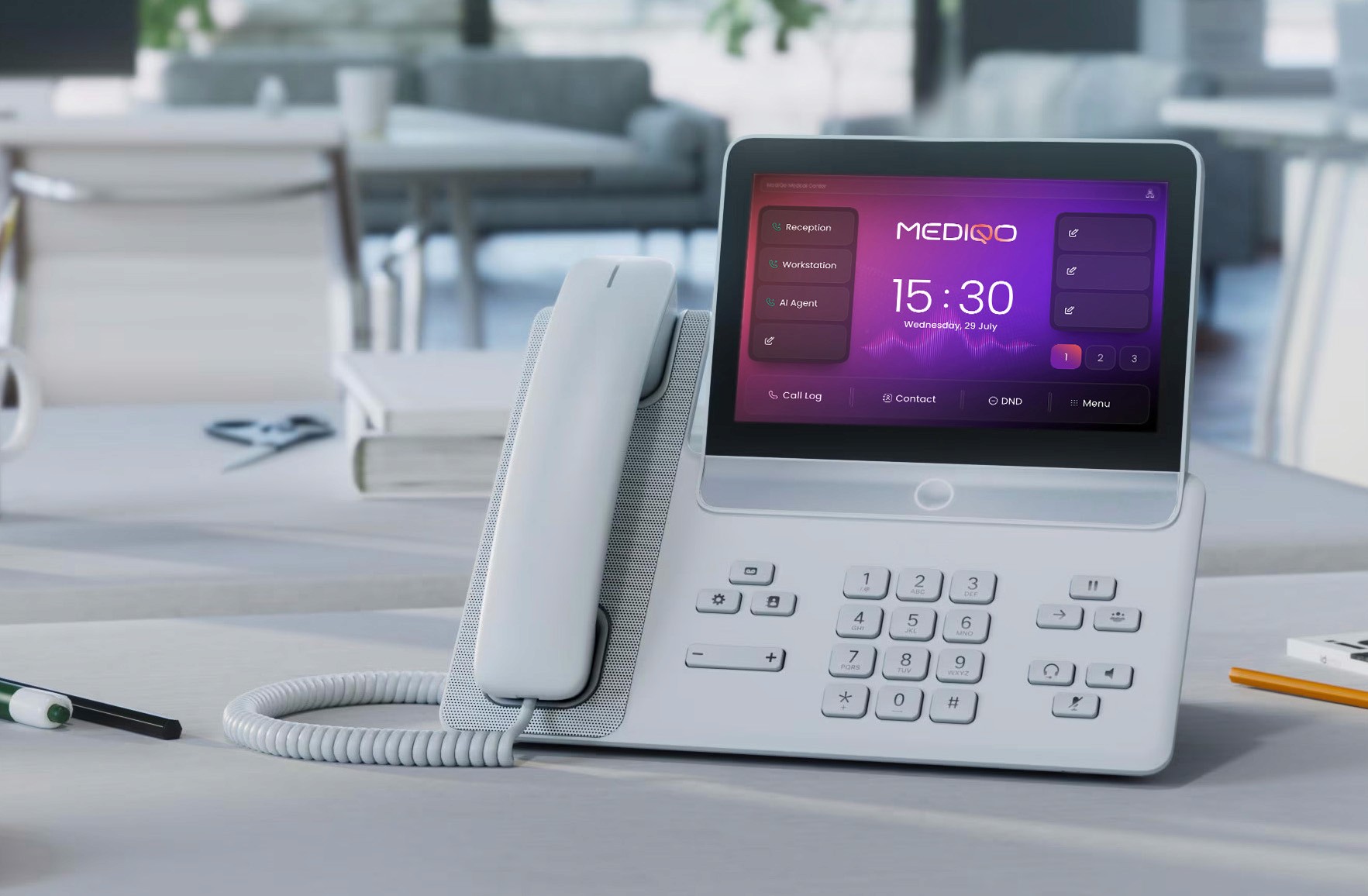
Try MediQo AI Phone Receptionists
MediQo AI receptionists answer patient enquiries and book patient appointments, capture patient details, manage cancellations and prepare pre-consult notes, after hours and when your admin team needs them.
Need Support?
Visit Support Centre
Request a Feature
Have an idea? We’d love to hear it.
Stay Updated
Get release notifications delivered to your inbox.