>Support
Search by topic, feature or keyword
What is this feature?
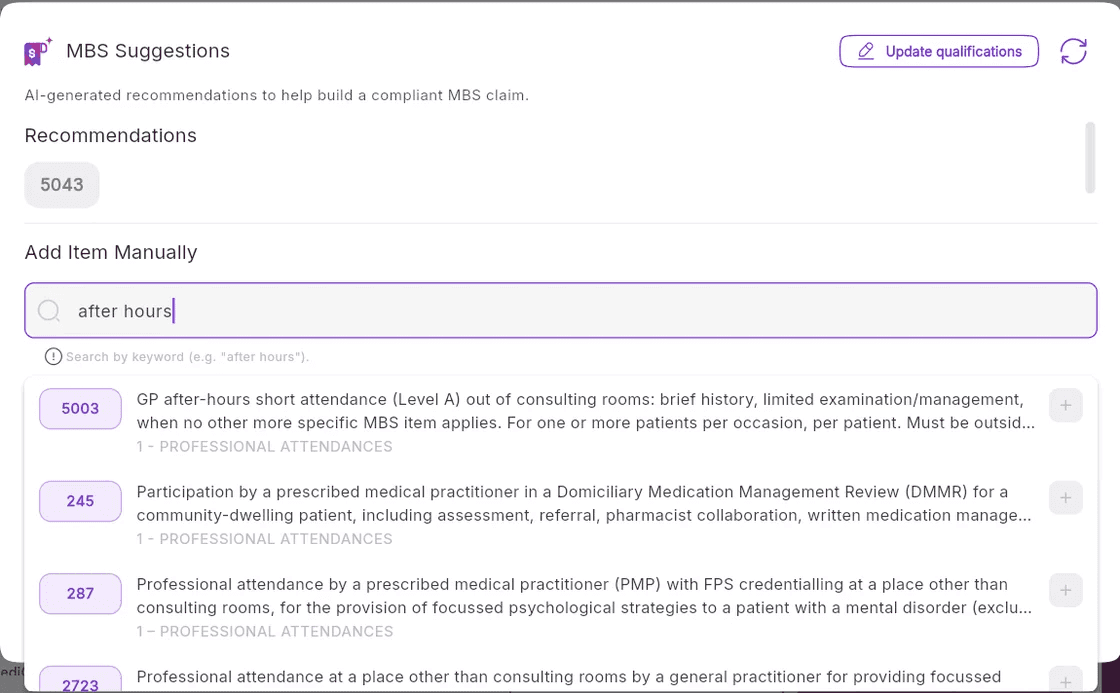
MediQo’s Smart MBS Billing Suggestions help you quickly identify and apply the correct Medicare item numbers during your consultations.
This enhanced feature makes it easier to navigate complex billing requirements by providing search functionality alongside context-aware recommendations and eligibility guidance — directly within your workflow.
This feature is available across all MediQo accounts, including those on a free trial.
How it works
While you’re in a patient consult:
Open the MBS Suggestions panel
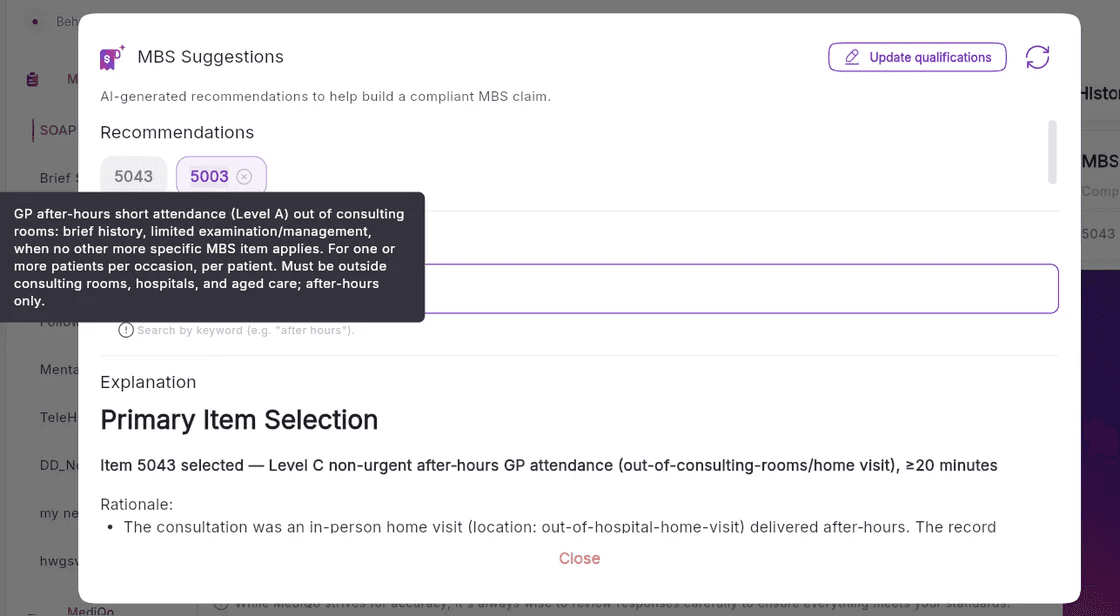
View recommended item numbers based on your consultation
Search for additional item numbers if needed
Review eligibility details before applying
MediQo automatically generates suggestions based on:
The context of your consultation
Your practitioner type
This ensures that recommendations are relevant, accurate, and aligned with your clinical activity.
Why this matters
MBS billing can be complex, with evolving rules and extensive schedules to navigate.
Traditionally, finding the correct item number requires searching external resources, cross-referencing guidelines, and manually confirming eligibility.
MediQo simplifies this process by surfacing the right information at the right time, so that you’re paid accurately for the care you provide.
Why clinics love this feature
With Smart MBS Billing Suggestions, MediQo helps you:
Quickly locate relevant item numbers
Find the right billing codes without leaving your workflow
Review eligibility requirements in context
Understand whether an item applies before selecting it
Reduce missed billing opportunities
Capture revenue that may otherwise be overlooked
Improve billing confidence and accuracyMake more informed decisions with less manual effort
How to get the most value
To maximise the impact of this feature:
Review suggested item numbers during each consult
Use the search function to explore alternative billing options
Check eligibility details before finalising billing
Combine with your existing workflows for consistent application
How this fits into MediQo
Smart MBS Billing Suggestions work alongside other MediQo features to improve both efficiency and revenue:
AI Medical Scribe reduces documentation time
AI Receptionist captures more patient bookings
Real-Time Billing Insights provide visibility into daily revenue
Together, these tools help you streamline workflows while improving financial outcomes.
Need help?
If you’d like help using MBS Suggestions or optimising your billing workflows, our team can assist.
👉 Contact Support (https://mediqo.health/support or book a session. (https://calendly.com/mediqo-support/success)