>Support
Search by topic, feature or keyword
What is this feature?
AI Outbound Calling allows your practice to automatically contact patients using MediQo's AI Receptionist.
Rather than having reception staff manually call patients one at a time, MediQo can launch outbound calling campaigns on your behalf to communicate with patients, reschedule appointments and manage routine administrative tasks.
The first campaign available within MediQo allows practices to automatically reschedule appointments when a doctor's availability changes.
Over time, additional campaign types will be released, including patient recalls, appointment reminders, test result follow-ups, health assessments, care plan reviews and other clinical outreach programs.
This feature is available to all MediQo AI Receptionist customers, including those on a free trial.
How it works
AI Outbound Calling automates patient communication using the same conversational AI technology that powers the MediQo AI Receptionist.
Simply log in to your MediQo dashboard and select ‘Outbound calls’ from the menu on the left
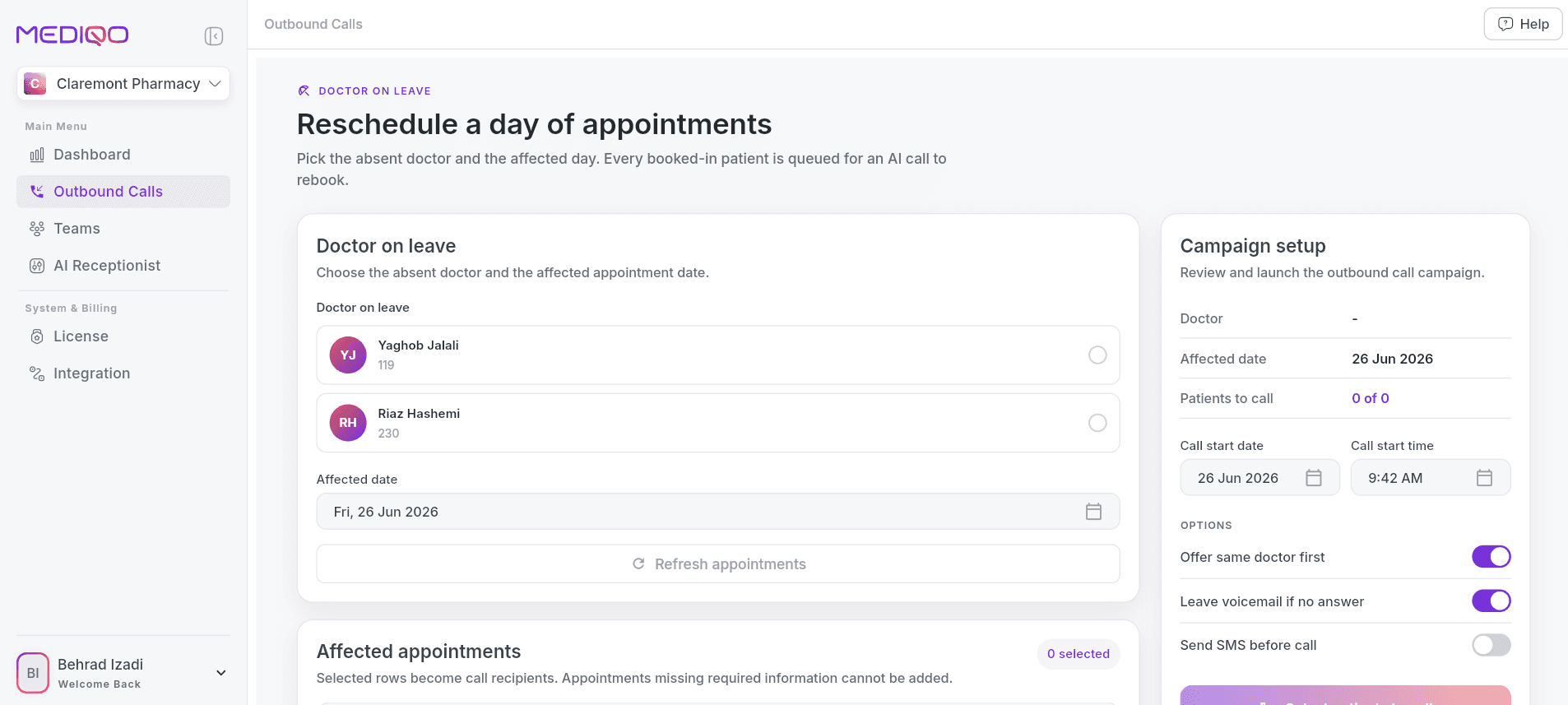
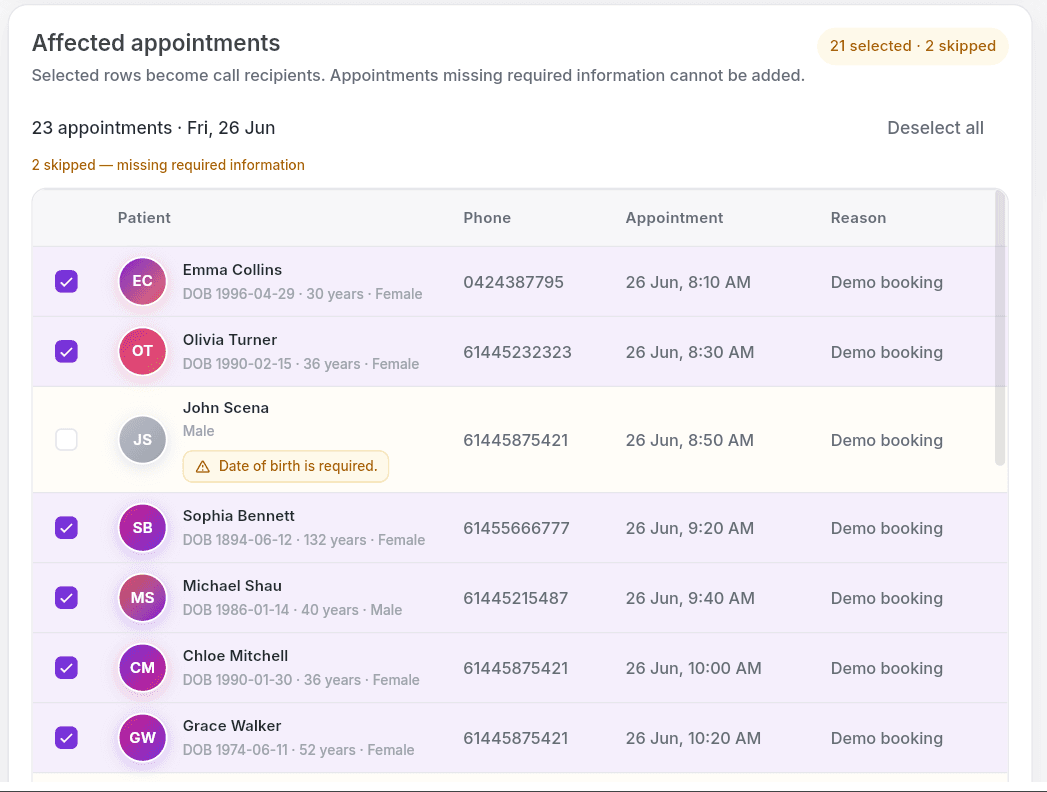
Then select the patients you'd like to contact…
Choose when you'd like the campaign to run…
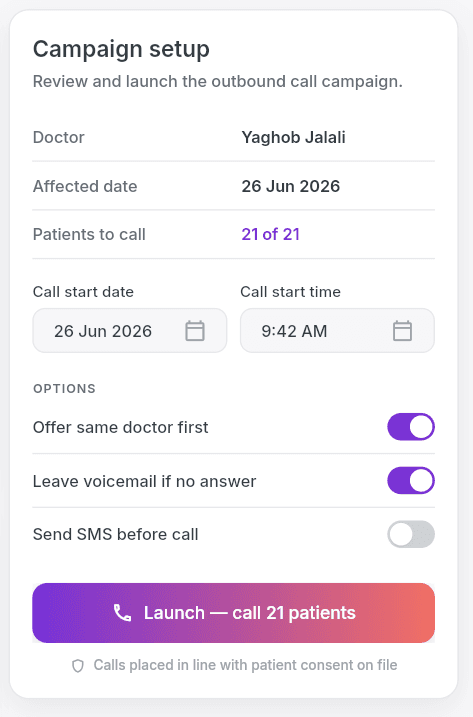
Customise your messaging...
And launch the campaign.
Before each call is placed, MediQo automatically sends the patient an SMS advising that the practice will shortly be in contact regarding their appointment.
The AI then calls patients on your behalf and follows your configured conversation script.
Where appropriate, MediQo can offer alternative appointment times and update bookings according to your clinic's workflow.
Creating an Outbound Calling Campaign
Getting started is simple.
Log in to your MediQo Portal
Select Outbound Campaigns
Click Create New Campaign
Select the campaign type (currently Appointment Rescheduling)
Choose the patients you'd like to contact
Select your preferred calling window
Review and customise the conversation script if required
Launch your campaign
MediQo will begin contacting patients automatically during your selected timeframe.
Managing appointment changes
The current release has been designed to simplify one of the most common challenges faced by reception teams: rescheduling appointments when clinician availability changes.
For example, if a doctor unexpectedly becomes unavailable, MediQo can automatically:
Contact affected patients
Explain that the appointment needs to change
Offer an appointment with another practitioner on the same day
Offer an alternative appointment with the original practitioner
Capture the patient's preferred option
Update appointment outcomes according to your workflow
This significantly reduces the time reception teams spend making manual phone calls.
Monitoring campaign progress
As your campaign runs, you can monitor activity directly within MediQo. Simply navigate to Outbound Calls > Usage
You'll be able to review:
Patients contacted
Successful conversations
Call outcomes
Appointment changes
Campaign completion status
Conversation summaries
Individual call history
This provides complete visibility over every patient interaction.

Why this matters
Managing unexpected appointment changes can consume hours of reception time.
When doctors become unavailable, practices often need to contact dozens of patients individually while continuing to answer incoming calls and support patients arriving at the clinic.
AI Outbound Calling automates this process, allowing practices to communicate with patients quickly, consistently and at scale.
Patients receive timely updates, appointments can be recovered more efficiently and reception teams are free to focus on higher-value administrative tasks.
Why clinics love this feature
With AI Outbound Calling, MediQo helps you:
Save hours of reception time
Automatically contact large groups of patients without making individual phone calls.
Respond quickly to schedule changes
Communicate appointment changes as soon as they occur.
Improve the patient experience
Keep patients informed with proactive SMS notifications and friendly AI conversations.
Recover appointments
Offer alternative appointment times before valuable consulting sessions are lost.
Scale communication effortlessly
Contact dozens—or even hundreds—of patients simultaneously within a scheduled calling window.
Maintain consistent messaging
Ensure every patient receives the same accurate information using configurable conversation scripts.
MediQo tips
To get the most value from AI Outbound Calling:
Review your patient list before launching each campaign.
Schedule campaigns during appropriate calling hours.
Review campaign outcomes to continuously improve patient communication.
Frequently Asked Questions
Does MediQo call every patient at the same time?
No. Calls are automatically distributed throughout your selected calling window to provide a smooth patient experience.
Can I customise what the AI says?
Yes. Outbound campaign scripts can be customised to suit your practice's preferred wording and workflows.
Do patients receive an SMS first?
Yes. Patients receive an SMS before the AI places the outbound call, letting them know your practice will shortly be in contact.
Can I contact multiple patients at once?
Yes. Campaigns can be launched for individual patients or entire appointment lists simultaneously.
What campaign types are currently available?
The initial release supports appointment rescheduling. Additional campaign types will be released progressively.
Need help?
If you'd like assistance setting up your first AI Outbound Calling campaign or optimising your patient communication workflows, our team would be happy to help.
👉 Contact Support: https://mediqo.health/support
👉 Book a Success Session: https://calendly.com/mediqo-support/success