>Support
Search by topic, feature or keyword
What is this feature?
The AI Receptionist Dashboard gives your practice real-time visibility into how your MediQo AI Receptionist is performing.
Rather than guessing how many calls have been answered, appointments booked or patients assisted, the Dashboard provides comprehensive reporting and operational insights from a single location.
You'll be able to monitor call volumes, patient bookings, appointment outcomes and AI usage, while also drilling into individual conversations whenever you need more detail.
This feature is available across the entire MediQo ecosystem, including all free trial accounts.
How it works
Every patient interaction handled by your AI Receptionist is automatically captured within the Dashboard.
The Dashboard aggregates this information into easy-to-read reports, allowing you to monitor performance over time while reviewing individual conversations whenever required.
Information updates automatically as your AI Receptionist answers calls, helping you understand exactly how your practice is performing.
Accessing the Dashboard
To view your AI Receptionist Dashboard:
Log in to your MediQo Portal
Select AI Receptionist
Click Dashboard
Your Dashboard will immediately display your current reporting metrics and recent activity.
Understanding your Dashboard
The Dashboard provides a high-level overview of your AI Receptionist's performance, including:
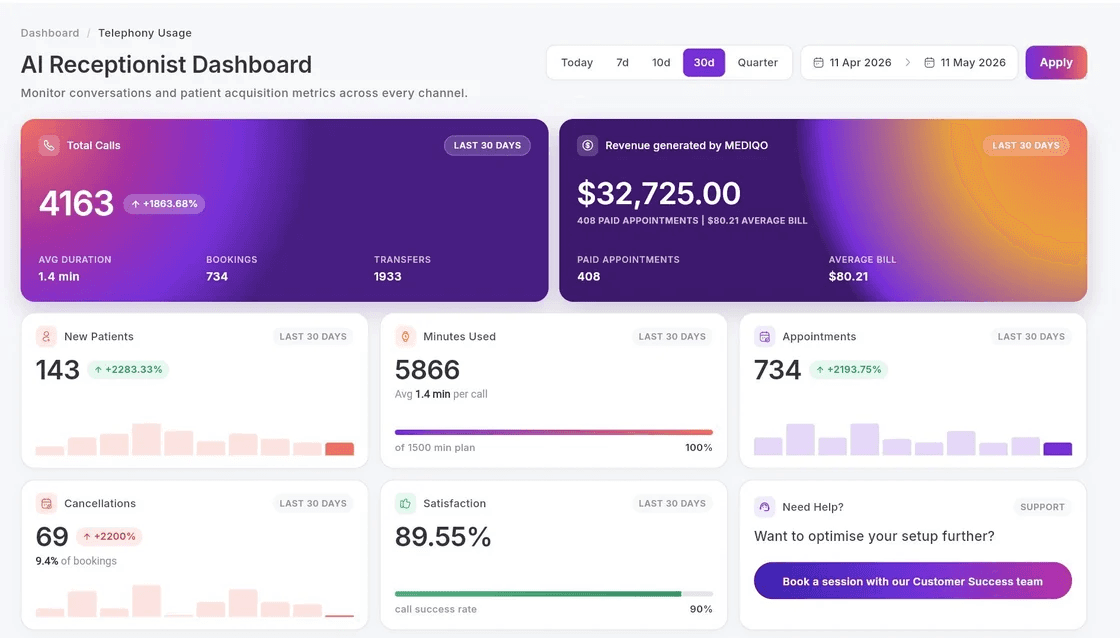
Total Calls Handled
See how many patient calls have been answered by your AI Receptionist over the selected reporting period.
Call Duration
Monitor the total amount of time the AI has spent speaking with patients and understand overall call activity.
New Patient Bookings
Track how many new patients have booked appointments through your AI Receptionist.
This provides valuable insight into patient acquisition and the contribution your AI Receptionist is making to practice growth.
Total Appointments Booked
View the total number of appointments successfully booked by the AI.
This includes both new and existing patients where applicable.
Appointment Cancellations
Monitor appointments cancelled through the AI Receptionist.
Understanding cancellation trends can help identify opportunities to improve appointment utilisation and patient communication.
Transfers to Reception
See how many calls required transfer to your reception team.
This metric helps identify:
Questions your AI may not yet be configured to answer
Knowledge base improvements
Workflow opportunities
Potential areas for further automation
AI Minutes Used
Monitor your total AI usage and understand how much work your AI Receptionist is completing on behalf of your practice.
Reviewing Conversation Summaries
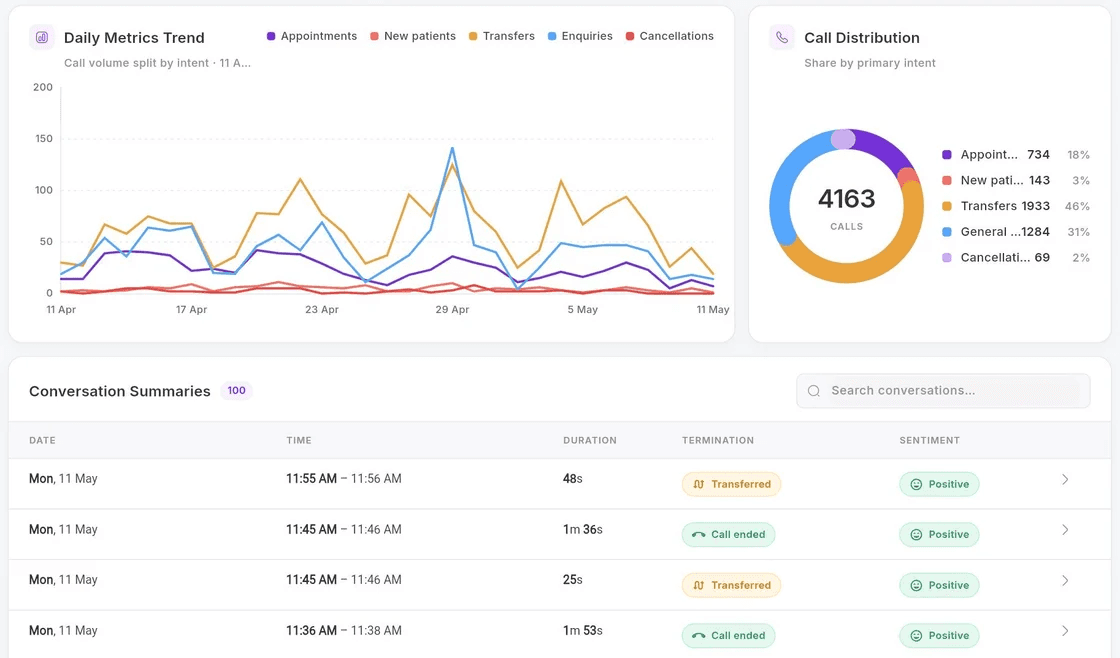
When you need more information about a specific patient interaction, simply click into Conversation Summaries.
Each conversation includes:
Date and time of the call
Call duration
Patient outcome
Conversation summary
Full interaction history
This allows you to quickly understand exactly what occurred during each patient conversation without listening to lengthy recordings.
Using Dashboard insights
The Dashboard isn't just a reporting tool.
It's designed to help practices continuously improve patient access and operational efficiency.
By reviewing your reporting regularly, you can identify:
Peak calling periods
Frequently asked patient questions
Common booking requests
Opportunities to improve your knowledge base
Workflow bottlenecks
Reception workload reductions
Patient acquisition trends
These insights help ensure your AI Receptionist continues to improve over time
Why this matters
Understanding the performance of your AI Receptionist is essential for measuring its value.
Without reportng, it's difficult to know how many patients have been assisted, how much administrative work has been reduced or where further optimisation may be possible.
The AI Receptionist Dashboard provides complete visibility into your patient interactions, allowing your practice to make informed operational decisions backed by real data.
Why clinics love this feature
With the AI Receptionist Dashboard, MediQo helps you:
Measure patient access
Understand how many patients are being supported by your AI Receptionist.
Monitor appointment performance
Track bookings, cancellations and patient acquisition in real time.
Understand receptionist workload reduction
See exactly how much work has been automated by the AI.
Improve patient experience
Review conversations and identify opportunities to continually improve patient interactions.
Optimise your knowledge base
Identify questions patients are asking most often and update your AI accordingly.
Make better operational decisions
Use real-time reporting to improve workflows, staffing and patient communication.
MediQo tips
To get the most value from the Dashboard:
Review reporting weekly.
Monitor transferred calls to identify knowledge gaps.
Regularly review conversation summaries.
Look for recurring patient questions that could be added to your AI knowledge base.
Track patient acquisition over time.
Frequently Asked Questions
How often is the Dashboard updated?
Reporting is updated automatically as your AI Receptionist handles patient interactions.
Can I view individual patient conversations?
Yes.
Conversation Summaries allow you to review individual calls, including conversation history, duration and outcomes.
Can I see how many appointments have been booked?
Yes.
The Dashboard tracks appointments booked, cancellations and new patient bookings.
Can I monitor transferred calls?
Yes.
Transferred calls are displayed within the Dashboard to help identify opportunities for further automation.
Can I use the Dashboard during my free trial?
Yes.
The AI Receptionist Dashboard is available to all MediQo customers, including practices currently using a free trial.
Need help?
If you'd like assistance understanding your Dashboard or optimising your AI Receptionist reporting, our team would be happy to help.
👉 Contact Support: https://mediqo.health/support
👉 Book a Success Session: https://calendly.com/mediqo-support/success